Each network opens different numbers to apps. Brandios reads what each one gives, for every post it publishes and for each account.
Social media analytics that change next week.
Brandios reads how each post does on LinkedIn Company Pages, Instagram, Facebook Pages and TikTok, again and again as it ages, and how your followers grow. Then every Sunday it tunes the next week from those numbers: how often each topic comes up, which formats and openings to lean on and, if Brandios picks your hours, when it posts.
What it reads, network by network
- LinkedIn Company Page
- Impressions
- Reach
- Reactions
- Comments
- Shares
- Instagram
- Views
- Reach
- Likes
- Comments
- Shares
- Saves
- Facebook Page
- Views
- Reach
- Clicks
- Reactions
- Comments
- Shares
- TikTok
- Views
- Likes
- Comments
- Shares
- Saves
- XFrom a screenshot you send
- LinkedIn profileFrom a screenshot you send
- On LinkedIn the numbers come from Company Pages; a personal profile’s come from a screenshot.
- On Facebook a Reel gives its views, likes and comments, and a Story is read in its first hours.
- TikTok gives no reach, and Instagram adds saves.
When it reads
Each post is read 6 hours after it goes out, then at 1, 2, 3, 7, 14 and 28 days. A Story is read in its first hours. Your followers are read once a day, so their line keeps up.
All your numbers on one page
The Analytics page shows the last 7, 28 or 90 days: what went out and its numbers against the period before, your followers over time, impressions a week and your top 3 posts. Each account has a “Read again” button for the latest, and each top post is tagged with its topic and format.
Every Sunday, a review
Once 5 posts from the last four weeks have numbers from 3 days after they went out, and while autopilot is on, Brandios reviews the week every Sunday. It reads what landed and what didn’t, then tunes the next week on its own. You see what changed on the Analytics page, under “The weekly review”, in its own words, such as “Leadership more often”, “Tuesday now posts at 08:30” or “Nothing changed”, and in your chat when something moved.
Every Monday morning your chat gets the week in a few lines: posts out, impressions, your best post and what comes next. A week with nothing posted and nothing read stays quiet.
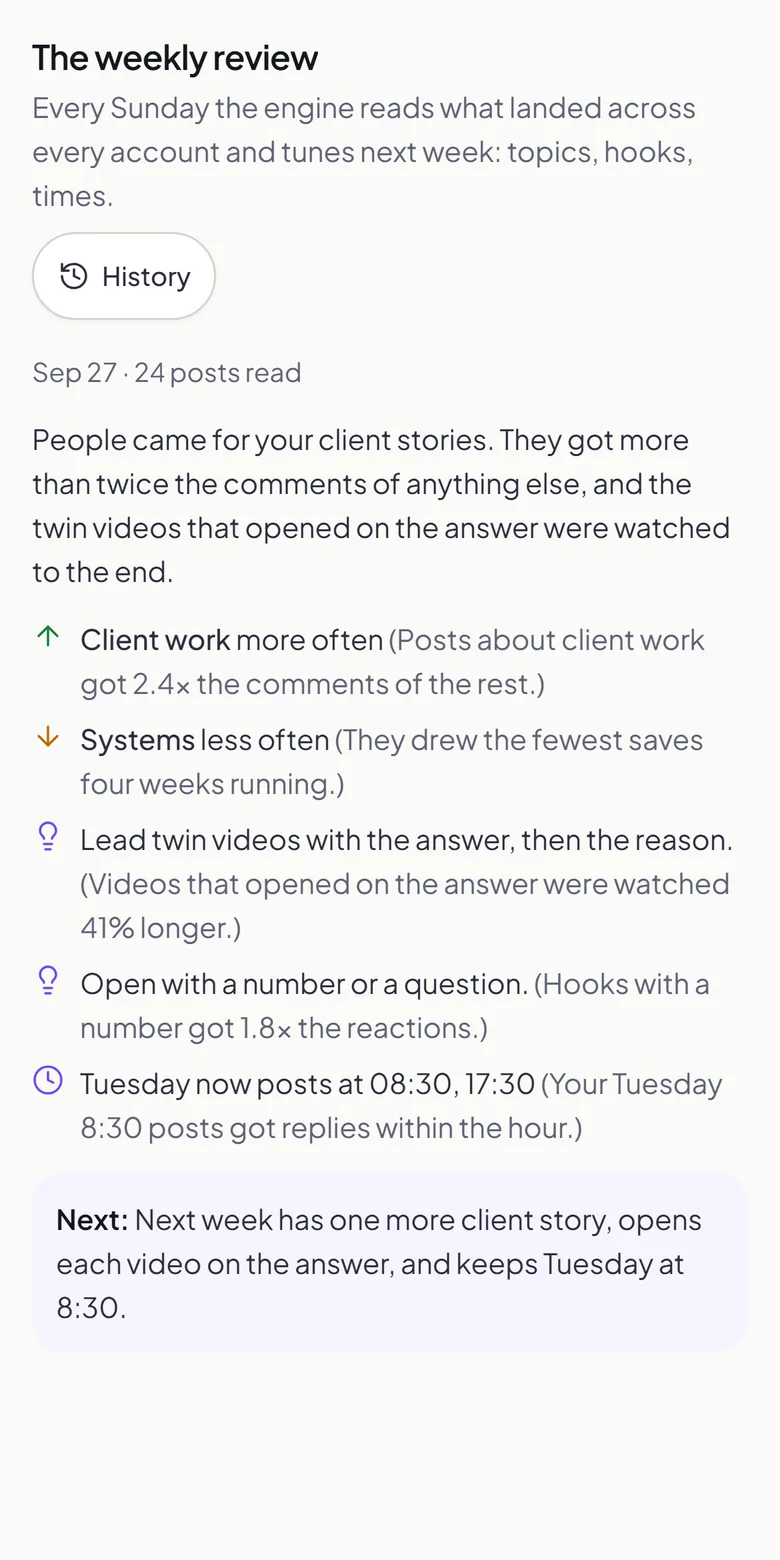
Last week, next week
What a review can change, it changes a little, so nothing jumps overnight.
Topic changes are saved as a new version of your brand profile, and you can restore an earlier one from its history.
Topics
Each topic’s weight, on a scale of 1 to 10, moves by 2 at most.
Times
Posting times move toward when your audience responds, never before 5 in the morning. Times you set yourself stay where you put them.
Videos
The days that carry a twin video can move; how many you get each week does not change.
Pictures
The number of pictures and carousels moves by one at most.
Numbers from a screenshot
Brandios doesn’t read your numbers from X by itself yet, so X posts are logged from a screenshot. LinkedIn opens a personal profile’s post numbers only to apps it approves, so for those, send a screenshot instead. The same works for any post you published yourself. Forward a screenshot of a post’s stats to your Telegram chat and Brandios reads the numbers off it and logs them to that post.
Questions people ask
- Which numbers does it show?
- For each post, what its network gives: views or impressions, reach where the network has it, reactions or likes, comments, shares, and saves on Instagram; a Facebook Reel gives its views, likes and comments. For each account, its followers over time and impressions a week.
- When does the weekly review start?
- Once autopilot is on and 5 posts from the last four weeks have numbers from 3 days after they went out.
- Can I undo what it changed?
- Topic changes are saved as a new version of your brand profile, and you can restore an earlier one. Your own posting times and your weekly number of twin videos stay as you set them; the number of pictures you set becomes a guide once a weekly review starts setting it, and the review tells you when.
- How often are the numbers read?
- Each post is read 6 hours after it goes out, then at 1, 2, 3, 7, 14 and 28 days. Your followers are read once a day, so their line keeps up.
- Does it change anything without asking?
- Yes, within small limits: the weekly review applies its changes on its own, then shows you what it changed on the Analytics page and in your chat. Topic changes can be undone from your brand profile’s history.
- Can I see my X numbers?
- Not on their own yet. Forward a screenshot of a post’s stats to your Telegram chat and Brandios logs them to that post.
- Does it track leads or sales?
- No. Brandios reads your posts’ numbers and your followers; it does not track leads, bookings or messages.
- What does it cost?
- Plans start at $49 a month. Filmed twin videos come with Starter ($99 a month), Pro ($199 a month) and Elite ($399 a month).