Add one or more accounts on each network, a LinkedIn profile and its Company Pages included, and choose for each how its posts go out.
Auto-post to five networks, with your yes.
Brandios publishes your posts to LinkedIn (your profile or a Company Page), Instagram, Facebook Pages, X and TikTok, at the hours that suit each network. You choose what waits for your yes, and answer with one tap, in the app or on Telegram.
Each account, its own way
Auto-publish
Goes out through the account
Send to my chat
We send it ready to copy, you post it yourself
Off
Nothing is sent
What waits for your yes
At sign-up Brandios asks whether you want to see posts before they go out: every post, only the ones with your face or voice, or never. You can change it in Settings at any time.
It asks two hours before a post goes out, and a day before when the post carries a twin video or a picture of you. If you don’t answer and you chose “Skip it”, the post moves to a later time, up to twice, then stays skipped; a twin video’s slot switches to a post without the video instead, or posts nothing if you’ve switched text posts off.
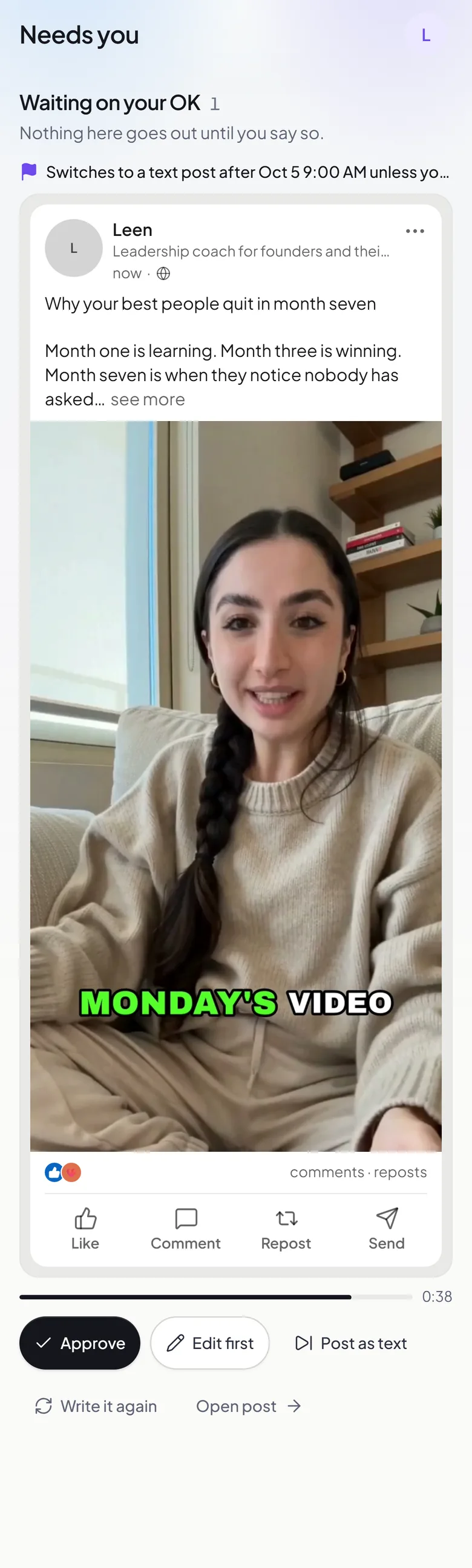 AI twin video
Ask me before every post
Nothing goes out until you say yes. Every post comes to you first.
Ask only when a post uses my face or voice
Twin videos and personal images come to you first; plain posts go out on their own.
Post everything automatically
Posts go out on their own. Twin-video takes, and any video whose voice may not sound like you, still come to you first.
If you don’t answer
Skip it: nothing posts without my yes
An unanswered ask won’t post and moves to a later time.
Post it anyway
An unanswered ask goes out at its time. A take whose voice was flagged never ships without your yes.
Every post, where it stands
The calendar says where each post is in a word or two: “Writing…”, “Scheduled”, “Needs you”, “Posting…”, “Posted” or “Didn’t post”. A post that needs you says why, and what happens if you leave it.
Writing…
Brandios is writing the post, or making its picture or video.
Scheduled
Ready, and waiting for its time.
Needs you
Waiting for your yes, or for you to fix something.
Posting…
On its way to the network.
Posted
Out on the network.
Didn’t post
It did not go out: skipped, or stopped on the way, with the reason in the app.
When each post goes out
Autopilot plans each slot from the timing table Brandios plans with, on the days you choose, and keeps the next seven days filled. Each account then posts at its own network’s hour for that slot, or at the slot’s time when that hour comes earlier. You can also set up to 5 times a day yourself. Open any post on the calendar to “Edit the words”, or choose “Publish now” to send it at once.
Tue, the hours Brandios ranks best on each network
LinkedIn11:00
Facebook18:00
Instagram19:00
X10:00
TikTok15:00
06:0012:0018:0023:00
Rather post it yourself?
Set an account to “Send to my chat” and, at the post’s time, Brandios sends the finished post to your Telegram chat, ready to copy: the words, with the picture when there is one, and the options to set by hand. Post it, then tap the button under it to say it’s up.
Brandiosbot
“Ten years in: what I would tell myself on day one”
📋 Your Facebook (Leen) post is ready. Save the image above, copy the text, post both, then tap I posted it:If I could go back to my first year of coaching, this is what I would say.
✅ I posted itEverything each network can take
Each post carries an options card for every network it goes to, for what goes out with it beyond the words and the media. Each network’s own page covers it in full.
- LinkedIn
- Your profile or a Page
- Who can see it
- A first comment
- A link on a text post
- A title under the video
- Resharing
- Facebook
- Feed, Story or both
- A link
- Who can see it
- Who sees it first
- The Reel’s title
- Picture descriptions
- Instagram
- Feed, Story or both
- Tag people
- The Reel’s cover
- Music
- Trial reels
- Paid partnership
- AI info label
- Picture descriptions
- X
- Written to your plan
- Up to 4 pictures, or one video
- No hashtags
- Post it yourself, if you like
- TikTok
- Who can see it
- Comments, duets and stitches
- Branded posts
- Made with AI
- Music on photo posts
- Your drafts
- A first comment
When a post doesn’t go out
Anything that didn’t post is listed in the app, each one grouped under what stopped it, in a sentence, beside the button that fixes it: “Retry it”, “Reconnect”, or a way to choose in Settings.
- “Its connection had expired.”
- “X was turning posts away for coming too fast.”
- “Instagram needs a picture or a video, and these had none for it.”
- “Facebook didn’t say whether they went out, so they may be up.”
- A failure the network calls temporary is tried again up to 2 times before it’s listed.
- A post that reached some networks and not others can be sent again to the rest from the calendar.
- Brandios checks your connections once a day.
Questions people ask
- Can it post to a LinkedIn Company Page?
- Yes, as well as your own LinkedIn profile.
- Can I connect more than one account on a network?
- Yes, and each one can be set to “Auto-publish”, “Send to my chat” or “Off”.
- Do I have to approve every post?
- No. You choose: every post, only the ones with your face or voice, or none apart from twin videos, which come to you first by default.
- What happens if a post fails?
- It is listed under what stopped it, with a button to fix it or try again. A failure the network calls temporary is tried again up to 2 times first.
- Can I post something right now?
- Yes. Open the post on the calendar and choose “Publish now”.
- Can I approve posts on WhatsApp?
- Not yet. You answer in the app or on Telegram.
- Does it post to YouTube or Threads?
- No. Brandios posts to LinkedIn, Instagram, Facebook Pages, X and TikTok.
- What does it cost?
- Plans start at $49 a month. Filmed twin videos come with Starter ($99 a month), Pro ($199 a month) and Elite ($399 a month).